Introduction:
Writing a good email sounds simple until you have to do it again and again. You may know what you want to say, but finding the right words, keeping the tone professional, fixing grammar, writing a strong subject line, and making the message clear can take more time than expected.
That is where AI email writers can help. The best AI email writers can turn a short prompt or rough idea into a clear email, improve an existing draft, generate replies, change the tone, and help you communicate faster. But every AI email writing tool is different. Some are designed for quick everyday emails, while others focus on Gmail, Outlook, sales outreach, marketing campaigns, grammar improvement, or complete inbox management.
So, which one should you choose?
The best AI email writers in 2026 include Smooli AI Email Writer, Grammarly, Gemini in Gmail, Microsoft Copilot, ChatGPT, Claude, Jasper, MailMaestro, Superhuman Mail, Lavender, and Shortwave. The right choice depends on whether you want a free email generator, better writing quality, inbox integration, sales email coaching, or advanced automation.
If you simply need to create a professional message without dealing with a complicated platform, Smooli's AI email writer is a useful place to start. You can use AI to create a new email or generate a reply while controlling elements such as tone and length. Smooli also provides a wider collection of AI writing tools for other everyday content tasks. Let's compare the 11 best AI email writers in 2026 and see where each tool works best.
Best AI Email Writers in 2026: Quick Comparison
| AI Email Writer | Best For | Free Option? | Main Strength |
|---|---|---|---|
| Smooli AI Email Writer | Quick everyday email writing | Yes | Simple email and reply generation |
| Grammarly | Grammar, clarity, and tone | Yes | Improving polished professional writing |
| Gemini in Gmail | Gmail users | Limited/native features | Deep Gmail and Google Workspace integration |
| Microsoft Copilot | Outlook users | Depends on Microsoft plan | Outlook and Microsoft 365 integration |
| ChatGPT | Flexible email drafting | Yes | Highly customizable prompts |
| Claude | Natural and detailed emails | Yes | Context-aware writing |
| Jasper | Marketing and brand emails | Trial | Brand voice and marketing workflows |
| MailMaestro | Gmail and Outlook productivity | Yes | Compose, reply, summarize, and organize |
| Superhuman Mail | Heavy email users | Primarily paid | Inbox speed and AI automation |
| Lavender | Sales and cold emails | Yes | Email scoring and sales coaching |
| Shortwave | AI-powered inbox management | Yes | Personalized writing plus inbox automation |
What Is an AI Email Writer?
An AI email writer is a software tool that uses artificial intelligence, natural language processing, and large language models to create or improve emails. Instead of writing every sentence yourself, you provide information such as who the email is for, what you want to communicate, and what tone you prefer. The AI then turns those instructions into a draft.
For example, you could enter: "Write a short professional follow-up email to a client who has not replied to my proposal."
An AI email generator can then create a complete message that you can review, personalize, and send. Modern AI email assistants can do much more than basic email generation. Depending on the tool, they may generate subject lines, summarize long email threads, create replies, fix grammar, change tone, personalize cold emails, search an inbox, or suggest follow-up messages.
How We Chose the Best AI Email Writers
There is no single AI email writer that is ideal for every person. A salesperson writing 50 cold emails has very different needs from a student sending a message to a professor. Likewise, someone working entirely in Gmail may prefer a tool that works inside Gmail instead of a separate AI writing platform.
For this comparison, the tools were evaluated based on their current publicly available features, ease of use, email-writing capabilities, free or paid availability, personalization options, integrations, tone control, and suitability for different types of users.
1- Smooli AI Email Writer - Best Free AI Email Writer for Quick Emails
Everyday users, professionals, students, freelancers, and anyone who wants a simple AI email generator. Smooli AI Email Writer is a straightforward option when your main goal is to create a good email without navigating a large email-management platform.
You can describe what you want to say and let AI create the email draft. It can also help create replies when you already have a message that needs an answer. This approach is especially useful for people who experience "blank page" problems. Instead of spending several minutes trying to create the perfect first sentence, you can generate a starting draft and then adjust it.
Smooli offers two main email-writing functions: Create New Email and Reply to Email. With Create New Email, you can describe what you want to say and let AI generate a complete email draft from scratch. With Reply to Email, you can provide an existing message and generate a suitable response based on its context.
These options are especially useful when you are unsure how to start an email or how to respond professionally. Instead of spending several minutes thinking about the perfect opening or reply, you can generate a draft in seconds and then personalize it before sending.
Smooli is also useful when you want to control the style of a message. For example, your email may need to sound professional for a client, friendly for a colleague, or more concise for a quick business update. The wider Smooli platform includes more than 60 productivity, writing, SEO, website, and file tools, so users can complete other digital tasks from the same platform.
Why choose Smooli: It is a good choice if you need an easy, dedicated AI email writing tool without paying for a complete email client or large marketing platform.
2- Grammarly - Best for Grammar, Tone, and Email Polishing
Professionals who already write their emails but want them to sound clearer and more polished. Grammarly is one of the most established AI writing assistants. Rather than focusing only on email generation, it helps improve writing across different apps and websites. For email, its main advantage is editing.
Grammarly can identify grammar problems, spelling errors, unclear sentences, and tone issues. Its generative AI features can also help create and rewrite text. This makes Grammarly particularly valuable when the content of your email is already written but you are unsure whether it sounds professional enough.
For example, a message that sounds too direct can be rewritten to sound more friendly, while a long and confusing email can be made clearer. Grammarly currently offers a free plan as well as paid options. Its free plan includes writing assistance and a limited number of AI prompts, while the Pro plan adds more rewriting and generative AI capabilities.
Why choose Grammarly: Choose it if grammar, clarity, tone, and professional writing quality are more important to you than complete inbox automation.
3- Gemini in Gmail - Best AI Email Writer for Gmail Users
Google has integrated Gemini directly into Gmail, making it one of the most convenient AI email assistants for people who live inside Google's ecosystem.
One particularly useful feature is its ability to work with other Google Workspace information. Gemini can reference relevant Google Drive files when helping users prepare responses, reducing the need to jump between several tabs.
For example, if you are replying to a client about a project update, Gemini may be useful when the relevant information is already stored in Gmail or Google Drive. Some basic Gmail writing features, such as Smart Compose, are widely available, while more advanced Gemini email features depend on the user's Google or Workspace plan.
Why choose Gemini: It is one of the most natural choices if Gmail is already the center of your work.
4- Microsoft Copilot Best AI Email Writer for Outlook
Best for: Businesses, professionals, and teams using Outlook and Microsoft 365.
Microsoft Copilot is the equivalent natural choice for many Outlook users. Copilot in Outlook can create email drafts from prompts, summarize long email threads, and provide coaching on areas such as clarity, tone, and sentiment. Microsoft says its Draft with Copilot feature can use email-thread context and organizational information when creating a response.
This can be especially helpful in business environments where employees already rely on Outlook, Teams, Word, Excel, and other Microsoft 365 applications. Rather than copying an email into a separate AI tool, users can work with AI within their existing productivity environment.
Why choose Microsoft Copilot: It makes the most sense for companies that already depend heavily on Microsoft 365.
5- ChatGPT Best for Flexible AI Email Drafting
Best for: Users who want full control over prompts, style, structure, and email ideas. ChatGPT is not exclusively an AI email writer, but it is highly flexible for email creation.
You can ask it to draft almost any type of email, including professional emails, job application emails, follow-ups, customer service replies, networking messages, sales emails, apology emails, meeting requests, and internal company communication.
Its main advantage is flexibility. Instead of choosing from a fixed email template, you can explain exactly what you need.
For example: "Write a polite 120-word email to a potential client following up after our product demo. Keep it friendly, confident, and avoid sounding pushy." You can then ask for a shorter version, a more formal version, alternative subject lines, or a different call to action. ChatGPT has free and paid plans, making it accessible for both occasional and frequent AI users.
Why choose ChatGPT: It is useful when you want flexible prompting and need help with many different types of communication.
6-Claude - Best for Natural and Context-Aware Emails
Best for: Detailed business messages, thoughtful responses, and users who prefer natural-sounding drafts. Claude from Anthropic is another general-purpose AI assistant that works well as an AI email generator.
It is especially useful when an email requires more context. For instance, you might provide a long background explanation about a project, customer problem, negotiation, or conversation and ask Claude to turn it into a clear email.
This makes it useful for detailed client communication, proposals, sensitive replies, project updates, and other messages where context matters. Claude currently provides a free plan as well as paid Pro and higher-tier options. Anthropic lists writing and content creation among Claude's available capabilities.
Why choose Claude: It is worth considering when you want to provide plenty of context and turn it into readable, natural communication.
7- Jasper - Best AI Email Writer for Marketing Teams
Best for: Marketing teams, businesses, agencies, and brands that need consistent messaging. Jasper is built more specifically around marketing content. That difference matters if your emails are part of a wider marketing campaign rather than simple one-to-one communication.
Jasper can be useful for promotional emails, campaign copy, product announcements, nurture content, and other branded marketing messages. One of its biggest strengths is brand consistency. Jasper allows businesses to define brand voice, knowledge, and audience information so AI-generated content better reflects the company's communication style.
Its browser-based capabilities can also bring writing assistance into tools such as Gmail and other web applications. Jasper is primarily a paid product, although it offers a trial. Its Pro plan is aimed at marketers and includes brand customization and marketing workflows.
Why choose Jasper: It makes sense when email is part of a larger content marketing and brand strategy.
9- Superhuman Mail - Best for High-Volume Email Users
Best for: Founders, executives, sales professionals, and people who spend a large part of their day in email. Superhuman takes a broader approach to AI email productivity. Writing emails is only part of the product. Its AI features also help users organize messages, prepare replies, search email, summarize conversations, and manage follow-ups.
Superhuman's Email Assistant is designed to work with Gmail and Outlook and can draft replies while using inbox context. Its current positioning focuses heavily on reducing the amount of manual work required to manage a busy inbox. This makes it particularly relevant for professionals receiving large numbers of emails every day.
Why choose Superhuman: It is better suited to people who want to improve their entire email workflow, not just generate individual messages.
10- Lavender - Best AI Email Writer for Sales Emails
Best for: Sales representatives, account executives, recruiters, and cold outreach. Lavender focuses specifically on sales email performance. Instead of simply generating an email and assuming it is good, Lavender analyzes sales messages and provides recommendations.
Its AI Email Coach can help create drafts, personalize messages, score emails, and suggest changes intended to make sales outreach stronger. The platform integrates with tools including Gmail, Outlook, HubSpot, Apollo, and Outreach.
That makes it much more specialized than general AI writing software. If you regularly send cold emails and care about factors such as personalization, readability, message length, and reply potential, Lavender offers features designed around those goals. A limited free plan is available, with paid plans providing broader usage.
Why choose Lavender: It is one of the strongest options in this list when your main purpose is sales outreach.
11-Shortwave - Best AI Email Writer for AI-Powered Inbox Manage
Best for: Gmail-focused users who want writing, search, organization, and automation together. Shortwave is more than an AI email generator. It is an AI-focused email client built around managing email more efficiently.
Its AI assistant can help write and improve emails, create contextual replies, summarize messages, search previous conversations, organize the inbox, and handle other email-related tasks.
Why choose Shortwave: It provides a strong combination of AI email writing and inbox intelligence.
Free vs. Paid AI Email Writers: Which Should You Choose?
A free AI email writer is often enough if your main goal is to create clear, professional emails quickly without paying for a monthly subscription.
For example, Smooli AI Email Writer is a practical option for users who want simple email-writing help without the extra complexity of a full email-management platform. It offers two useful functions: Create New Email and Reply to Email. You can generate a fresh message from scratch or create a response to an existing email, then review and personalize the result before sending.
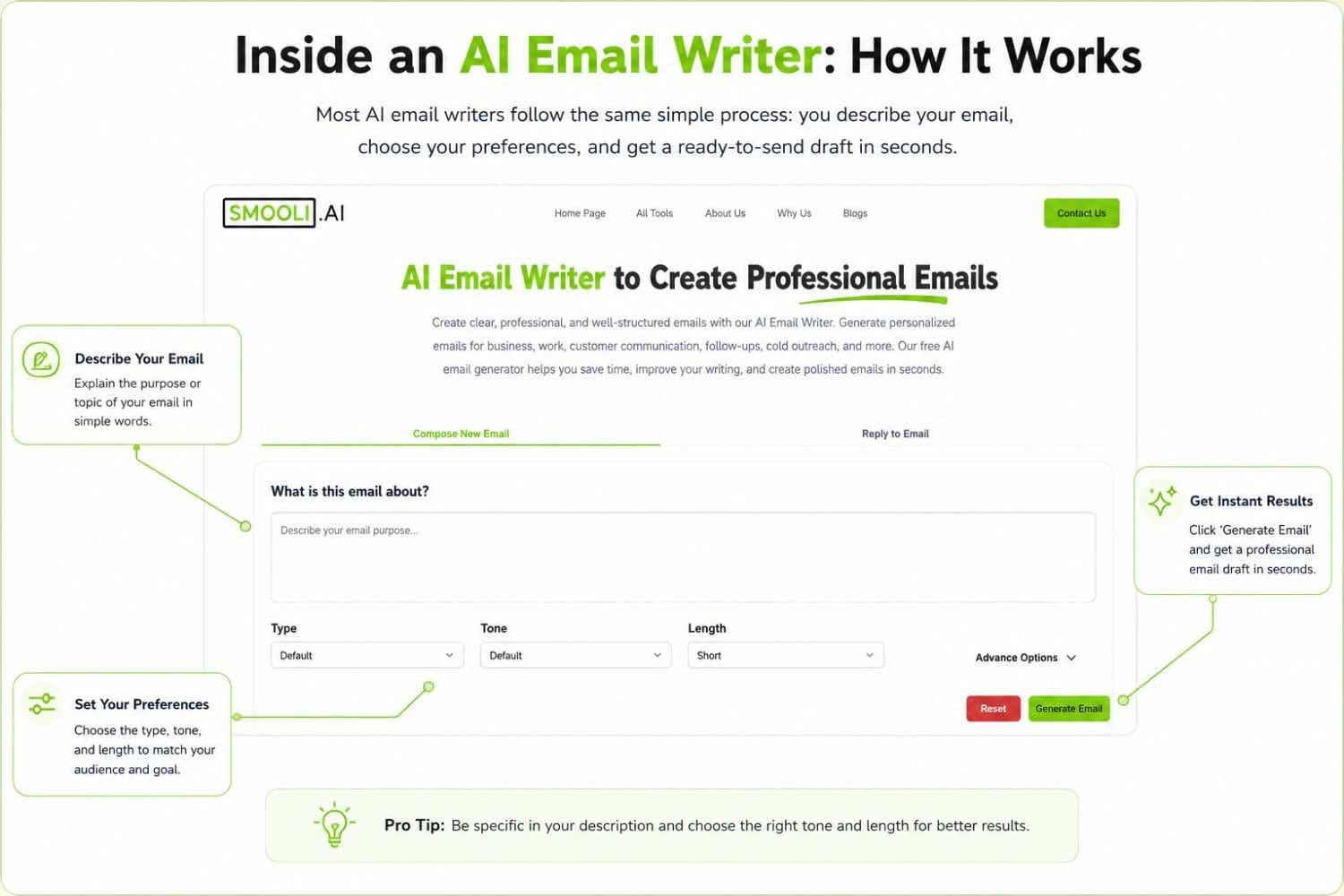
This makes Smooli a good fit for students, freelancers, professionals, small business owners, and everyday users who mainly need help with drafting, replying, tone, and wording.
Paid AI email assistants become more useful when email is a major part of your job and you need advanced features beyond writing. For example, sales teams may want email scoring and outreach personalization, executives may need inbox summaries and automation, and larger businesses may require CRM integrations, administrative controls, security features, or team collaboration.
Frequently Asked Questions About AI Email Writers
What is the best AI email writer in 2026?
There is no single best AI email writer for everyone. Smooli AI Email Writer is a good free option for quick email generation and Grammarly is strong for grammar and tone, Gemini works well for Gmail users.
Can AI write professional emails?
Yes. AI can generate professional business emails when it receives clear instructions about the purpose, recipient, tone, and key points. However, the user should review the email before sending it to confirm that names, facts, dates, and other important information are accurate.
Can AI email writers improve email subject lines?
Yes. Generative AI can suggest alternative email subject lines based on the purpose of your message. This is particularly useful for sales outreach, marketing emails, follow-ups, event invitations, and professional communication where the subject needs to be clear and specific.
Is it safe to use AI email writers for business communication?
Yes, as long as you avoid pasting sensitive or confidential information into tools that don't have clear data privacy policies. Always review the AI-generated draft before sending, and check each tool's privacy terms if you're sharing internal business details.
Final Thoughts
The best AI email writers in 2026 do more than fix spelling mistakes. They can generate complete emails, create replies, adjust tone, summarize conversations, personalize outreach, and help users spend less time staring at an empty compose box.
But the most advanced tool is not automatically the best one for you.
For straightforward email generation, start with a simple tool such as Smooli AI Email Writer. For editing and tone, consider Grammarly. Gmail users may prefer Gemini, while Outlook users may find Microsoft Copilot more convenient. Choose based on your actual email habits, not the longest feature list.
A good AI email writer should ultimately do one thing well: help you communicate clearly in less time while still keeping the final message personal and accurate.