Al-generated images are now good enough to confuse almost anyone. Over 80 million Al images are now generated every day across platforms, according to Everypixel Journal, a volume that makes manual detection impractical at scale. A product photo may look real. A social media post may appear to show a real event. A profile picture may feel authentic. A blog image may look like it came from a camera, even when it was created by a prompt.
That creates a practical problem: how do you know whether an image is real, Al-generated, edited, or simply taken out of context?
The honest answer is this: you should not rely on one clue. Hands, teeth, text, and strange backgrounds can still reveal Al images, but modern image generators have become much better at fixing those old mistakes. A safer approach is to combine visual inspection, metadata checks, reverse image search, provenance signals, and an Al image detector.
This guide explains how to detect Al-generated images step by step. You will learn what to check first, which signs matter, which mistakes to avoid, and how tools like Smooli Al can help you make faster, more confident decisions when reviewing images online.
The Simple Answer: Use Multiple Checks, Not One Guess
The best way to detect Al-generated images is to look for several signals together.
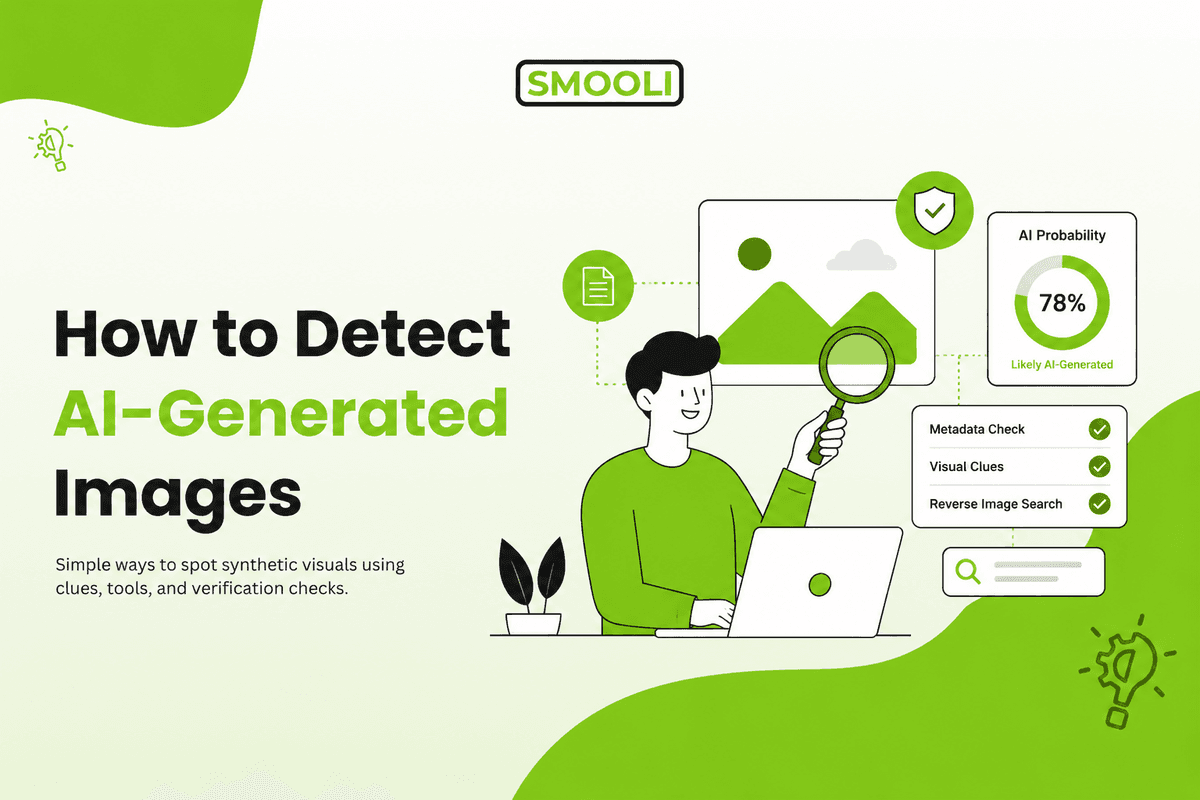
Start with the image itself. Check whether faces, hands, text, shadows, reflections, patterns, and background objects make sense. Then look beyond the pixels. Check the file metadata, search for the image source, and use an Al image detector as supporting evidence.
A practical workflow looks like this:
- Inspect the image visually.
- Check for unnatural details or repeated patterns.
- Run a reverse image search.
- Review metadata or Content Credentials if available.
- Use an Al detection tool.
- Compare all signals before making a judgment.
The key is not to ask, "Does this image look fake?" A better question is, "What evidence supports or weakens the claim that this image is real?"
For example, if a viral image shows a celebrity at a breaking-news event, visual inspection alone is weak. You should also check whether news outlets have published the same image, whether the image appeared online before the event, and whether the file contains signs of Al generation.
Why Al Images Are Getting Harder to Spot
Early Al-generated images often had obvious problems. Hands had too many fingers. Faces looked waxy. The text was unreadable. Objects blended into each other. Backgrounds felt dreamlike.
Those signs still appear, especially in low-quality Al images, but they are less dependable than they used to be.
Modern image models can create more realistic skin, cleaner lighting, sharper backgrounds, and better anatomy. Some Al images now look polished enough for ads, social posts, thumbnails, product mockups, and even fake news visuals.
Research published in Science found that the human ability to correctly identify Al-generated photographs has dropped to around 38% accuracy, below random chance. Imagera Al's 2026 detection benchmark roundup summarises this alongside current tool performance rates.
That does not mean detection is impossible. It means detection has changed. You need to move from "spot the weird detail" to "verify the evidence."
A beginner's mistake is trusting confidence too quickly. An image can look real and still be Al-generated. It can also look strange and still be a real photo taken with unusual lighting, editing, motion blur, or camera distortion.
The safest mindset is calm skepticism. You are not trying to accuse every image of being fake. You are trying to build enough confidence before you trust, publish, share, or act on it.
First, Check the Details That Al Still Gets Wrong
Visual inspection is still useful, especially as a first pass. It helps you decide whether the image deserves deeper checking.
Look carefully at areas where Al models often make subtle mistakes.
Faces, Eyes, and Skin Texture
Al-generated faces can look too smooth, too symmetrical, or slightly empty. Skin may have a plastic finish. Wrinkles, pores, scars, and hairlines may appear inconsistent. In group photos, one person may look sharp while another face in the background looks distorted.
Check the eyes too. Reflections in the pupils should make sense based on the light source. If each eye reflects a different scene, or if the highlights look unnatural, treat that as a warning sign.
Example: A professional headshot may look realistic at first glance. Zoom in and check the ears, hairline, teeth, glasses, and skin around the eyes. Al often performs well on the main face but struggles with small supporting details.
Hands, Fingers, and Body Position
Hands are better than they used to be, but they are still worth checking. Look for fingers that merge, knuckles that do not align, missing nails, odd wrist angles, or hands that do not match the person's body position.
Also, check posture. Al images sometimes create bodies that look fine until you follow the shoulders, elbows, waist, or legs. A person may be holding an object in a way that would be uncomfortable or physically impossible.
Mistake to avoid: Do not assume every odd hand means Al. Real photos can capture strange gestures. Use hand issues as one signal, not a final verdict.
Text, Logos, and Small Writing
Al still struggles with small text, labels, signs, badges, book covers, and logos. Words may look almost correct but contain broken letters, uneven spacing, fake characters, or nonsense writing.
This is one of the most useful checks for marketing teams, ecommerce teams, and publishers. If an image includes packaging, a street sign, a document, a certificate, a product label, or a screenshot-like visual, zoom in and inspect the text carefully.
Example: A fake product photo may show a beautiful box design, but the ingredients, brand logo, or label text may be misspelled or unreadable.
Background Objects and Repeated Patterns
Al often gives most attention to the main subject. Background objects may receive less detail. Look for chairs with strange legs, shelves that bend, windows that do not align, plants that merge into walls, or patterns that repeat unnaturally.
Crowds are another useful area. In Al-generated event images, background faces may look blurred, duplicated, or oddly shaped. Clothing patterns may melt together. Hands and phones in the crowd may not make sense.
A practical check: cover the main subject with your hand and study only the background. This forces you to inspect the parts your eyes normally ignore.
Check Lighting, Shadows, and Reflections
Real photos follow physical rules. Al images can imitate those rules, but small mistakes still happen.
Look at the direction of light. If the light source is on the left, shadows should generally fall in a consistent direction. If a person is standing near a window, the highlights on their face, hair, and clothing should match that window's position.
Reflections are also important. Mirrors, water, glass, cars, sunglasses, and shiny tables should reflect the surrounding scene in a believable way.
Example: If a person is standing in front of a mirror, the reflection should match their pose, clothing, and room layout. If the reflection shows a different arm angle or a missing object, that is a strong reason to investigate further.
For product images, check whether the shadow under the product looks natural. Al-generated product mockups may have shadows that are too soft, too perfect, or disconnected from the object.
Use Reverse Image Search to Check the Image's History
Reverse image search does not directly prove whether an image was Al-generated. Its value is context.
It helps you answer questions like:
- Has this image appeared online before?
- Was it posted before the event it claims to show?
- Is it connected to a different person, place, or story?
- Does a higher-quality version exist somewhere else?
- Are fact-checking websites discussing it?
Use tools such as Google Lens, Google Images, TinEye, or similar visual search tools. Upload the image or paste the image URL. Then compare where else it appears.
Example: A post claims an image shows a flood in Karachi this week. Reverse image search shows the same image was published two years ago in another country. Even if the photo is real, the current claim is misleading.
This matters because not every suspicious image is Al-generated. Sometimes the image is real but used in the wrong context. A strong detection process should catch both Al generation and misrepresentation.
Check Metadata, but Do Not Treat It as Proof
Metadata is information stored inside an image file. A real camera photo may include EXIF data such as camera model, lens, aperture, shutter speed, ISO, GPS location, and creation date.
Al-generated images may have little metadata, edited metadata, or signs that software created the file. Some tools may also include generation details, prompts, model names, or Content Credentials.
To check metadata, you can use your operating system's file details, an EXIF viewer, or a content authenticity tool.
Useful signs include:
- Camera make and model
- Lens and exposure settings
- Original creation date
- Editing software history
- Al generation labels
- Content Credentials
- Missing or inconsistent file data
But metadata has limits. Social media platforms and messaging apps often strip metadata from uploaded images. Metadata can also be changed. A missing camera model does not prove the image is Al-generated, and camera data does not always prove the image is authentic.
Decision factor: metadata is helpful when it supports other evidence. It is risky when used alone.
Look for Content Credentials and Provenance Signals
Content Credentials are based on the C2PA (Coalition for Content Provenance and Authenticity) open standard, which cryptographically embeds provenance data directly inside a media file, recording who created it, when, and whether Al was involved. The standard reached version 2.2 in May 2025, with major support from Adobe, Google, OpenAl, Sony, and Samsung. The EU AI Act, effective August 2026, cites C2PA-style provenance as a required transparency mechanism for Al-generated content.
You can verify Content Credentials using the official C2PA verification tool or by checking the "cr" icon that appears on supported images in compatible platforms and browsers.
One important limitation: C2PA metadata is often stripped when images are uploaded to social media or shared via messaging apps. A missing credential does not mean an image is fake; it usually means the metadata was removed in transit. For a detailed breakdown of how the standard works and where it falls short, SoftwareSeni's C2PA explainer is a reliable technical reference.
Use an Al Image Detector as Supporting Evidence
An Al image detector analyzes an image and estimates whether it may have been created by artificial intelligence. It may look at texture patterns, pixel-level signals, metadata, compression, noise, and other technical markers.
For most users, this is one of the fastest ways to screen an image. Smooli Al offers an Al image detector that can help creators, marketers, website owners, and content reviewers quickly check suspicious visuals before using or publishing them.
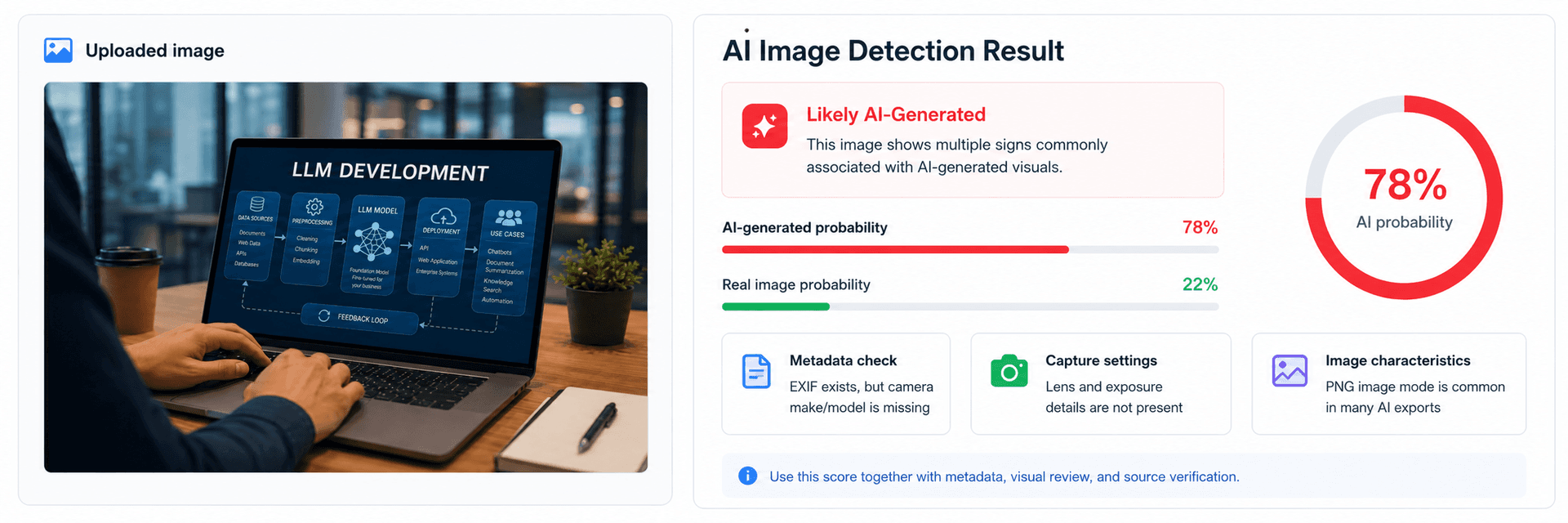
The important word is "estimate." Al detectors should not be treated as a courtroom-level answer. They can produce false positives and false negatives. A real image may be flagged as Al after heavy editing. An Al image may pass if it has been compressed, cropped, screenshotted, or modified.
A good use case: you are reviewing blog images, guest post graphics, product visuals, social media submissions, or marketplace photos. A detector can help you quickly decide which images need deeper review.
A bad use case: accusing someone publicly based only on one detector score. Always combine the result with context, metadata, reverse search, and visual inspection.
Build a Practical Image Verification Workflow
A strong workflow saves time and reduces risk. It also helps teams make consistent decisions instead of relying on personal opinions.
Here is a simple process you can use:
Step 1: Save the best available version of the image.
Avoid screenshots when possible. Screenshots often remove useful file data.
Step 2: Inspect the image at full size.
Check hands, faces, text, background objects, reflections, shadows, and repeated patterns.
Step 3: Search for the image online.
Use reverse image search to find earlier appearances, sources, or mismatched context.
Step 4: Check metadata and provenance.
Look for EXIF data, editing history, Al labels, or Content Credentials.
Step 5: Run an Al detector.
Use the detector result as one signal, not the only answer.
Step 6: Decide based on risk.
A casual blog illustration may only need basic checking. A news image, legal image, medical image, political image, or product claim needs a higher standard.
Smooli Al can fit into this process as part of a wider review system. Its Al detection tools are useful for people who want a faster way to review Al-related content without jumping between too many separate tools.
How Marketers, Publishers, and Website Owners Should Handle Al Images
Detecting Al-generated images is not only about avoiding fake content. It is also about trust.
If you run a website, blog, ecommerce store, agency, or media brand, images influence how people judge your credibility. A fake-looking image can make a strong article feel weak. A misleading product visual can increase complaints. An unverified news-style image can damage trust.
Here are practical rules for content teams:
- Use Al images clearly and responsibly.
- Avoid Al images for proof-based claims unless labeled.
- Do not use Al-generated people in a way that suggests real customers, real employees, or real case studies.
- Keep original files when possible.
- Add clear alt text and captions.
- Review image rights, usage terms, and disclosure needs.
- Use detection tools before publishing user-submitted or third-party visuals.
Example: If you publish an article about cybersecurity, an Al-generated header image is usually fine if it is used as a general illustration. But if you publish a fake screenshot of a data breach, that becomes misleading.
The decision is not simply "Al image or no Al image." The better question is, "Will this image help the reader understand the content without confusing them about what is real?"
Common Mistakes to Avoid When Detecting Al Images
Many people approach Al image detection with too much confidence. That creates errors.
One common mistake is relying only on old visual signs. Extra fingers, strange teeth, and warped faces still matter, but they are not enough. High-quality Al images may avoid these problems completely.
Another mistake is trusting detector percentages too literally. A score such as "87% likely Al" is not the same as proof. It means the tool found patterns that match its model. The image still needs context.
A third mistake is ignoring misattribution. A real image can still be used dishonestly. Reverse image search helps you catch this.
A fourth mistake is checking a low-quality screenshot instead of the original file. Screenshots often remove metadata and compress details, making detection harder.
A final mistake is making public accusations too quickly. If the image affects someone's reputation, business, safety, or legal position, treat detection as a serious verification process, not a quick reaction.
When You Cannot Know for Sure
Sometimes, after every check, you still will not have a clear answer.
That is normal.
The image may have no metadata. Reverse search may return nothing. The detector may be uncertain. The image may look realistic. In that case, the right conclusion is not "real" or "fake." The right conclusion is "unverified.".
For low-risk content, you may decide not to use the image. For high-risk content, ask for the original file, source confirmation, creator details, camera evidence, or additional proof.
A practical phrase for teams is:
"We could not verify the origin of this image, so we should not use it as evidence."
That sentence protects trust. It also keeps your content standards clear.
Editorial Note from Smooli Al
This guide was created by the Smooli Al editorial team to help readers, creators, marketers, and website owners make better decisions about visual content. The goal is not to create fear around Al images. Al-generated visuals can be useful for design, education, marketing, and creative work.
The real issue is context. Readers deserve to know when an image is being used as illustration, proof, documentation, or persuasion. By combining practical inspection with Al detection tools and source checking, you can reduce risk and publish with more confidence.
A Clear Next Step
If you only remember one thing, remember this: do not judge an image by appearance alone.
Start with visual clues, then verify the source, check metadata, look for provenance signals, and use an Al image detector as supporting evidence. The more important the image is, the more checks you should run.
For everyday content review, this process can help you avoid misleading visuals, protect brand trust, and make better publishing decisions without slowing your workflow.
Frequently Asked Questions
Can Al-generated images be detected accurately?
Al-generated images can often be detected, but not always with complete certainty. The best results come from using multiple checks together, including visual inspection, metadata review, reverse image search, provenance signals, and an Al image detector.
What is the easiest way to tell if an image is Al-generated?
The easiest first step is to zoom in and check details such as hands, eyes, text, shadows, reflections, and background objects. After that, use a reverse image search and an Al detector to support your judgment.
Are Al image detectors always correct?
No. Al image detectors can make mistakes. They may flag real images as Al-generated or miss Al images that have been edited, compressed, or screenshotted. Treat detector scores as helpful signals, not final proof.
Does missing metadata mean an image is Al-generated?
No. Missing metadata does not prove an image is Al-generated. Many platforms remove metadata when images are uploaded or shared. Metadata is useful, but it should be compared with other evidence.
What are the most common signs of Al-generated images?
Common signs include distorted hands, strange teeth, unnatural skin texture, broken text, inconsistent lighting, incorrect reflections, repeated patterns, and background objects that do not make sense. These signs are useful but not always present.
How can I check if a viral image is fake?
Start with reverse image search to see where the image appeared before. Then check the source, date, metadata, and visual details. If needed, use an Al detector. For serious claims, do not share the image unless its origin is verified.
Should businesses disclose Al-generated images?
Businesses should disclose Al-generated images when the images could affect trust, proof, identity, product expectations, or editorial accuracy. Disclosure is especially important for product visuals, testimonials, news-style content, and images that show people or events.